Spending Too Much? How to Make a Simple Money Journal to Take Control of Your Life

Why Start a Money Journal?
Making a money journal is the best way to enhance your cash management ability. . This is like weight scaling method for diet. Just by weighing yourself everyday, you see your weight changes, and you naturally avoid over eating. Similarly, tracking your spending helps you see where your money goes and stop wasting it. You’ll know your monthly spending patterns, understand what “too much” looks like for you, and learn to spend confidently within your safe zone. The result? You can treat yourself without causing a cash crunch, and even build up savings!
Choosing Your Tracking Method
There are several ways to keep a money journal – notes, apps, or spreadsheets. I strongly recommend using a spreadsheet like Excel or Google Sheets (which is free!). Here’s why:
Why Spreadsheets Win:
- You can see ALL your spending for the month on one sheet
- Very flexible – customize it exactly how you want
- Easy to calculate numbers (we’ll show you how!)
- Quick to input a whole week’s worth of spending using your keyboard
About Money Management Apps:
Good Points:
- Input numbers right after purchasing
- Automatic calculations
Challenges:
- Ads pop up constantly
- Limited customization options
- Tedious to input multiple transactions later
- Can’t see all transactions at once – just monthly totals
That’s why my #1 recommendation is using a spreadsheet on your computer. While some find apps tiring to maintain, if you’re already using one comfortably, that’s totally fine! (I’ll share some tips later to make apps work better for you.)
Getting Started with Spreadsheets
Before diving in, let’s learn one simple but powerful spreadsheet tool: =SUM()
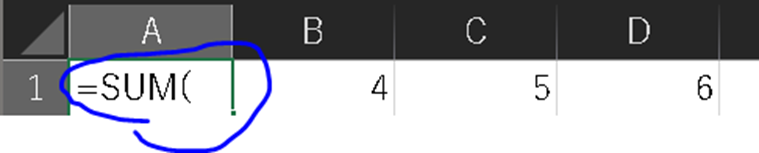
Here’s what =SUM() does – it adds up numbers automatically for you! Think of it as a smart calculator built right into your spreadsheet. Here’s how simple it is:
1. Type =SUM( in cell A1
2. Select the cells you want to add up (just click and drag from B1 to D1)
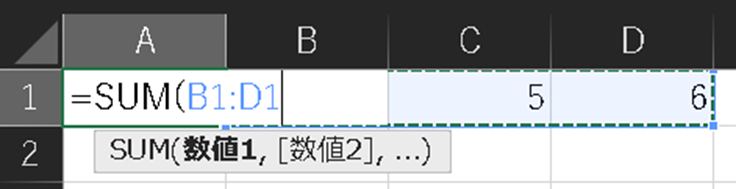
3. Press enter, and magic! You get the total automatically
Let’s Begin Your Money Journey
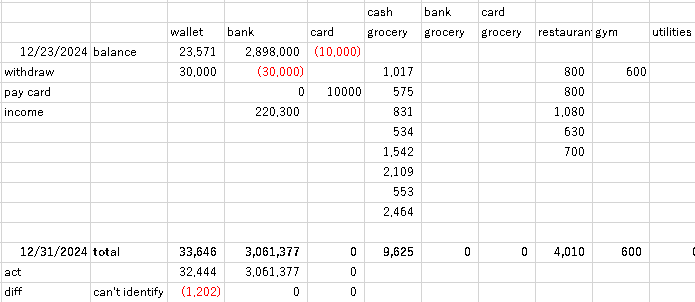
The key point is to track both your balances and spending in the same sheet.
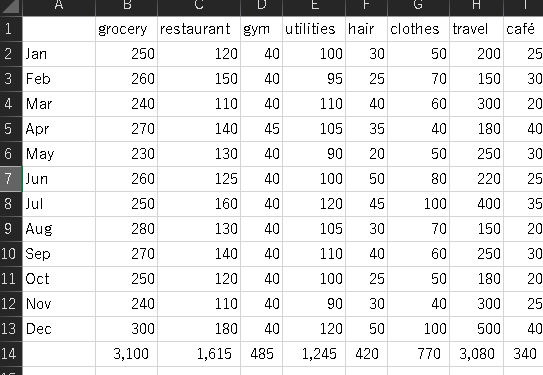
Here is a sample of the spreadsheet. You can customize it by adding new categories or deleting existing ones as you like.
Step 1: Know What You Have
First, write down all the money you have right now:

- Count your wallet cash
- Check your bank account balance online
- Look up your credit card balance (remember: credit card balance shows as a negative number since it’s money you owe)
- Record these numbers in your spreadsheet. This is your starting point!
Step 2: Track Your Spending (The Easy Way!)
Here’s a secret: You don’t have to track every penny every day. Instead:
- Keep ALL your receipts in one place (while a folder or envelope works, I find putting receipts in a wallet right after buying something works best)
- Once a week, gather all your receipts and your favorite drink
- Review your:
- Paper receipts
- Bank transactions online
- Credit card charges
- Online shopping history (Amazon, etc.)
- Fill in each expense in the right category (like FOOD, CAFE, etc.)
- Payment method matters! For example, if you buy groceries sometimes with cash, sometimes with bank, sometimes with card, separate them into three categories: cash-grocery, bank-grocery, and card-grocery. Then add these three to get your total grocery spending.
Step 3: Don’t Forget Money Moves
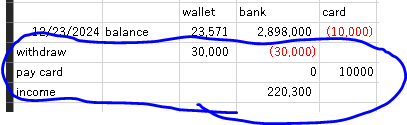
Remember to record when you:
- Take cash from the ATM (subtract from BANK, add to WALLET)
- Pay credit card bill (subtract from BANK, add to CARD. Since credit is basically debt, if you owe $100, the balance is -$100. When you pay it, you add $100, making it 0)
- Get paid (add to BANK)
Step 4: Calculate Your Balances
Here’s where it gets interesting – do these weekly and at month’s end:
- Add up spending in each category (like total FOOD spending) using =SUM(
- Subtract spending from your starting balance
- Add/subtract all money moves (from Step 3, like card payments)
- This gives you your calculated balance
Step 5: Weekly (and End of Month) Balance Check
- Compare with your actual balances (wallet, bank balance, and card balance online)
- Different numbers? Don’t panic! This is normal. Check all receipts for any missed costs
- Try to remember any spending without receipts
- Can’t find the difference? Don’t worry too much, but take it as a sign to check more often next time – try every 3 days instead.

Step 6: Spot Your Patterns
At month’s end:
- Review each category’s total spending (Surprised by coffee expenses?)
- Look at all spending on the sheet, identify any large individual purchases
- Keep monthly category totals in one place to compare
- Watch how your spending habits change over time!
If You’re Using Money Management Apps
Even when using apps, check if your app balance matches your actual balance weekly. If they don’t match, it means some of your app entries aren’t accurate or you’ve missed some spending.
Look for the differences using Step 5 above. Always keep your receipts until you’ve confirmed that your balances match.
App Recommendation
If you are looking for a budgeting app, I recommend “Money Manager Expense & Budget”. It’s a straightforward, user-friendly app that covers all the basic features you need to manage your finances.
Extra Tip
I paste my receipts into a large notebook (like a scrapbook) so I can check details later – but this is completely optional!